조합 연산자 란?
여러 개 옵저버블을 조합하여 하나로 합하는 연산자다.
- 이미 선언한 옵저버블이 있다면 이를 재사용 할 수 있다.
- 각 옵저버블을 따로 구독해 분산되는 콜백을 옵저버블 하나에서 관리할 수 있도록 모으기도 한다.
1. merge 연산자
merge 연산자는 조합 연산자이므로 하나의 합한 옵저버블을 만든다. 즉, 기존 옵저버블이 발행하는 값을 변환하는 것이 아니라, 여러 옵저버블을 인자로 사용해 옵저버블 하나로 만들고, 인자로 나열된 각각의 옵저버블을 함께 구독한다.
merge 연산자로 합한 옵저버블은 각 옵저버블에서 먼저 발행된 값부터 발행한다. 인자로 나열된 순서와 상관없이 여러 옵저버블 중 먼저 값을 발행한 것을 한 곳에서 발행할 때 적절한 연산자다.

연산자 원형
merge<T, R>(
...observables: Array<ObservableInput<any> | schedulerLike | number>
): OperatorFunction<T, R>
- observables - 배열, 스케줄러, 숫자 타입을 사용
/* merge 연산자 사용 예 */
const { timer, merge } = require('rxjs');
const { map } = require('rxjs/operators');

const req1$ = timer(Math.floor(Math.random() * 2000)).pipe(map(value => 'req1'));
const req2$ = timer(Math.floor(Math.random() * 1000)).pipe(map(value => 'req2'));
const req3$ = timer(Math.floor(Math.random() * 1500)).pipe(map(value => 'req3'));

merge(req1$, req2$, req3$).subscribe(req => console.log(`response from ${req}`));
[코드 6-1] merge 연산자 사용 예
실행 결과
response from req1
response from req3
response from req2
mergeMap 연산자와 달리 옵저버블을 인자로 나열할 수 있다. 동시에 옵저버블을 구독해 먼저 발행한 값부터 발행한다.
1-1. 동시에 구독하는 옵저버블 수를 정하는 방법
merge연산자는 두 번째 인자 (concurrent)에 숫자 타입의 값을 설정하면 해당 수만큼 동시에 구독한다.
최대 동시 구독 개수에 도달하면, 나머지 옵저버블은 나열된 순서대로 배열에 저장한다. 그리고 동시에 구독 중인 옵저버블 중 하나의 구독을 완료할 때마다 배열에서 저장한 순서대로 다음 옵저버블을 구독한다.
/* 동시에 구독하는 옵저버블 예 */
const { timer, merge } = require('rxjs');
const { map, take } = require('rxjs/operators');

const req1$ = timer(0, 200)
  .pipe(map(value => `req1: ${value}`), take(6));
const req2$ = timer(0, 500)
  .pipe(map(value => `req2: ${value}`), take(11));
const req3$ = timer(0, 300)
  .pipe(map(value => `req3: ${value}`), take(7));
const req4$ = timer(0, 500)
  .pipe(map(value => `req4: ${value}`), take(9));
const req5$ = timer(0, 100)
  .pipe(map(value => `req5: ${value}`), take(8));
const req6$ = timer(0, 700)
  .pipe(map(value => `req6: ${value}`), take(4));
const concurrent = 2;

merge(req1$, req2$, req3$, req4$, req5$, req6$, concurrent)
  .subscribe(req => console.log(`response from ${req}`));
[코드 6-2] 동시에 구독하는 옵저버블 예
실행 결과
response from req1: 0
response from req2: 0
response from req1: 1
response from req1: 2
response from req2: 1
response from req1: 3
response from req1: 4
response from req2: 2
response from req1: 5
response from req3: 0
response from req3: 1
response from req2: 3
response from req3: 2
response from req3: 3
response from req2: 4
response from req3: 4
response from req2: 5
response from req3: 5
response from req3: 6
response from req4: 0
response from req2: 6
response from req4: 1
response from req2: 7
response from req4: 2
response from req2: 8
response from req4: 3
response from req2: 9
response from req4: 4
response from req2: 10
response from req5: 0
response from req5: 1
response from req5: 2
response from req5: 3
response from req4: 5
response from req5: 4
response from req5: 5
response from req5: 6
response from req5: 7
response from req6: 0
response from req4: 6
response from req4: 7
response from req6: 1
response from req4: 8
response from req6: 2
response from req6: 3
옵저버블 각각을 구독하는 총 시간
- req1$ : 1초 (200ms * (6 - 1) = 1000ms)
- req2$ : 5초 (500ms * (11 - 1) = 5000ms)
- req3$ : 1.8초 (300ms * (7 - 1) = 1800ms)
- req4$ : 4초 (500ms * (9 - 1) = 4000ms)
- req5$ : 0.7초 (100ms * (8 - 1) = 700ms)
- req6$ : 2.1초 (700ms * (4 - 1) = 2100ms)
2. concat 연산자
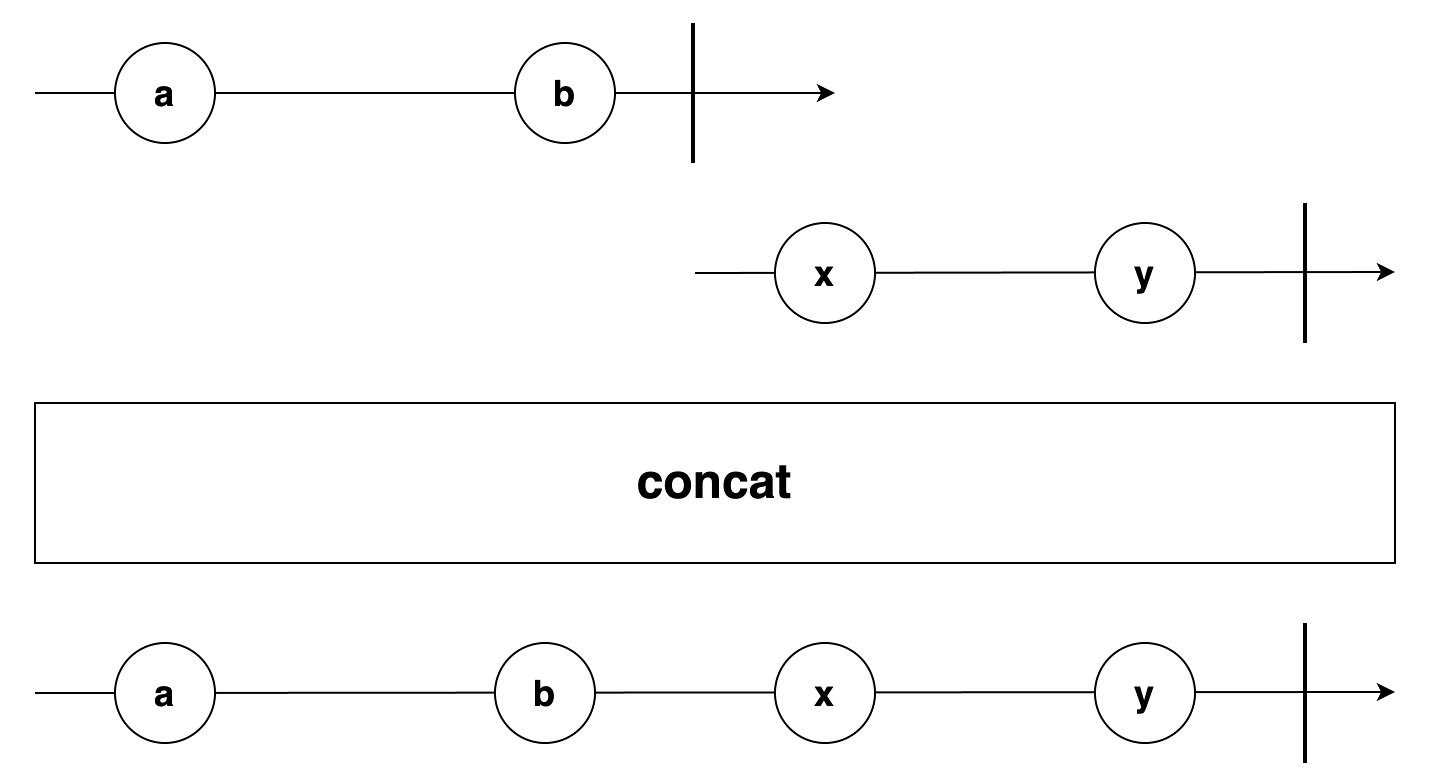
concat 연산자는 옵저버블의 구독 순서를 보장한다. 연산자 내부에서 merge 연산자를 이용하며 동시에 구독할 수 있는 concurrent 값을 1로 설정한다.
첫번째 인자의 옵저버블을 먼저 구독하고 그 뒤에 에는 옵저버블은 순서대로 배열에 저장한다. 옵저버블을 구독 완료하면 배열에 저장한 순서대로 1개씩만 꺼내서 구독한다.
연산자 원형
concat<T, R>(
...observables: Array<ObservableInput<any> | SchedulerLike>
): OperatorFunction<T, R>
/* concat 연산자의 사용 예 */
const { timer, concat } = require('rxjs');
const { map } = require('rxjs/operators');

const req1$ = timer(Math.floor(Math.random() * 2000)).pipe(map(value => 'req1'));
const req2$ = timer(Math.floor(Math.random() * 1000)).pipe(map(value => 'req2'));
const req3$ = timer(Math.floor(Math.random() * 1500)).pipe(map(value => 'req3'));

concat(req1$, req2$, req3$).subscribe(req => console.log(`response from ${req}`));

/*
* 위의 코드는 아래 코드와 동하게 동작한다.
* merge(req1$, req2$, req3$, 1).subscribe(req => console.log(`response from ${req}`));
* */
[코드 6-3] concat 연산자의 사용 예
실행 결과
response from req1
response from req2
response from req3
옵저버블 각각의 구독 시간은 무작위이지만 req1$의 구독을 완료해야 req2$를 구독하며, req2$의 구독을 완료해야 req3$의 구독한다.
3. forkJoin 함수
forkJoin 함수는 연산자는 아니지만 동시성을 보장하면서 순서도 보장하는 함수다.
모든 옵저버블을 동시에 구독한 후 완료되면, 옵저버블을 나열한 순서대로 배열에 각 옵저버블에서 가장 마지막에 발행한 값을 저장했다가 해당 배열을 발행한다.
함수 원형
forkJoin<T>(
...sources: Array<ObservableInput<T> | ObservableInput<T>[] | Function>
): Observable<T[]>
- sources - 배열이나 연산자에 직접 사용하는 파라미터다. 사용하는 옵저버블 수를 뜻한다.
특징 - 동시에 실행하므로 concat 연산자보다 전체 옵저버블의 구독 완료 시간은 줄어든다.
/* forkJoin 함수의 사용 예 */
const { timer, forkJoin } = require('rxjs');
const { take, map } = require('rxjs/operators');

const req1$ = timer(0, 2000)
  .pipe(take(2), map(value => `req1 result: ${value}`));
const req2$ = timer(0, 1000)
  .pipe(take(2), map(value => `req2 result: ${value}`));
const req3$ = timer(0, 1500)
  .pipe(take(2), map(value => `req3 result: ${value}`));
console.time('forkJoin example time');

forkJoin(req1$, req2$, req3$).subscribe(result => {
  console.timeEnd('forkJoin example time');
  console.log('== forkJoin req1$, req2$, req3$ result ==');
  console.log(`result: ${result}`);
  console.log(`result is Array: ${Array.isArray(result)}`);
  Array.isArray(result) && console.log(`result length: ${result.length}`);
});
[코드 6-4] forkJoin 함수의 사용 예
실행 결과
forkJoin example time: 2.003s
== forkJoin req1$, req2$, req3$ result ==
result: req1 result: 1,req2 result: 1,req3 result: 1
result is Array: true
result length: 3
옵저버블 3개는 timer 함수와 take(2) 로 처음에는 값을 바로 발행하며, 다음은 일정 시간이 흐른 후 값을 발행하고 구독을 완료한다.
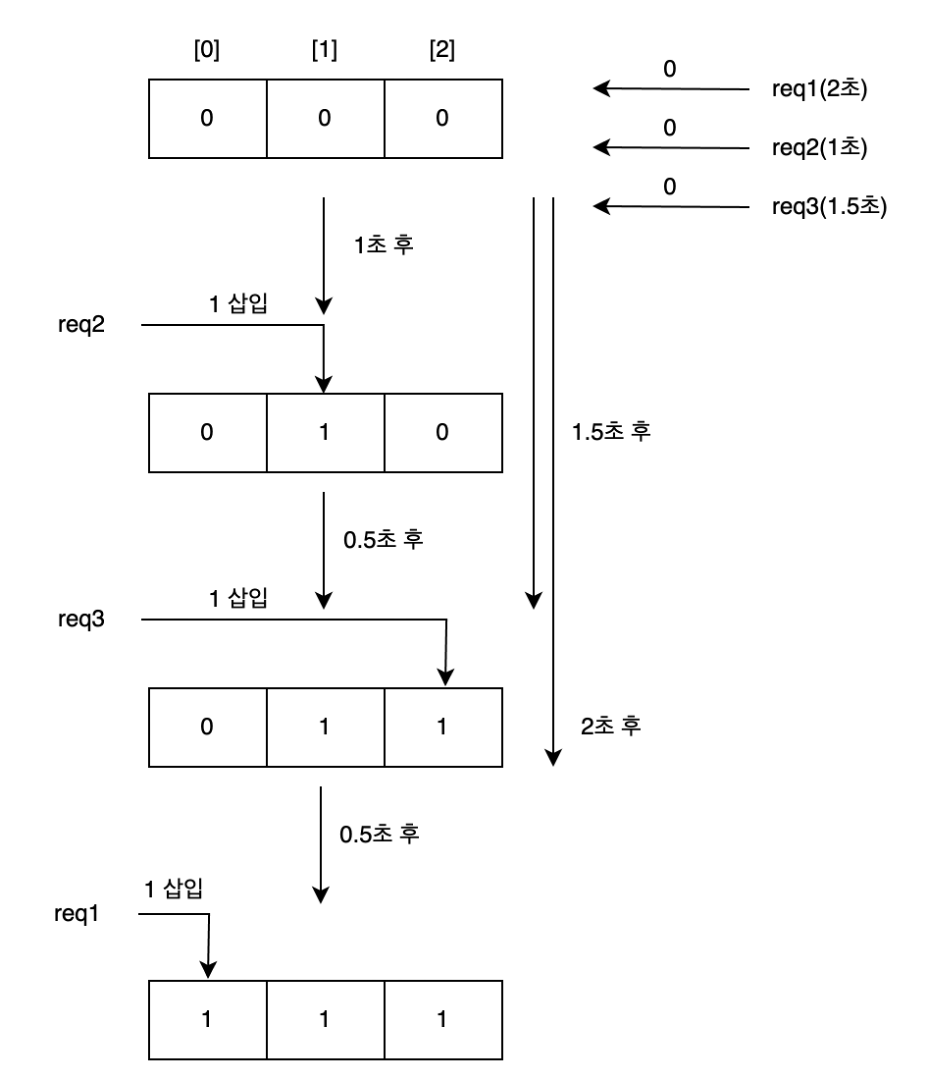
옵저버블이 3개이므로 길이가 3인 배열에 각 옵저버블에서 값을 발행하면 해당 순서의 배열을 찾아 값을 업데이트 한다. 모든 옵저버블 구독을 완료하면 마지막으로 업데이트한 배열을 발행한다.
4. combineLatest 연산자
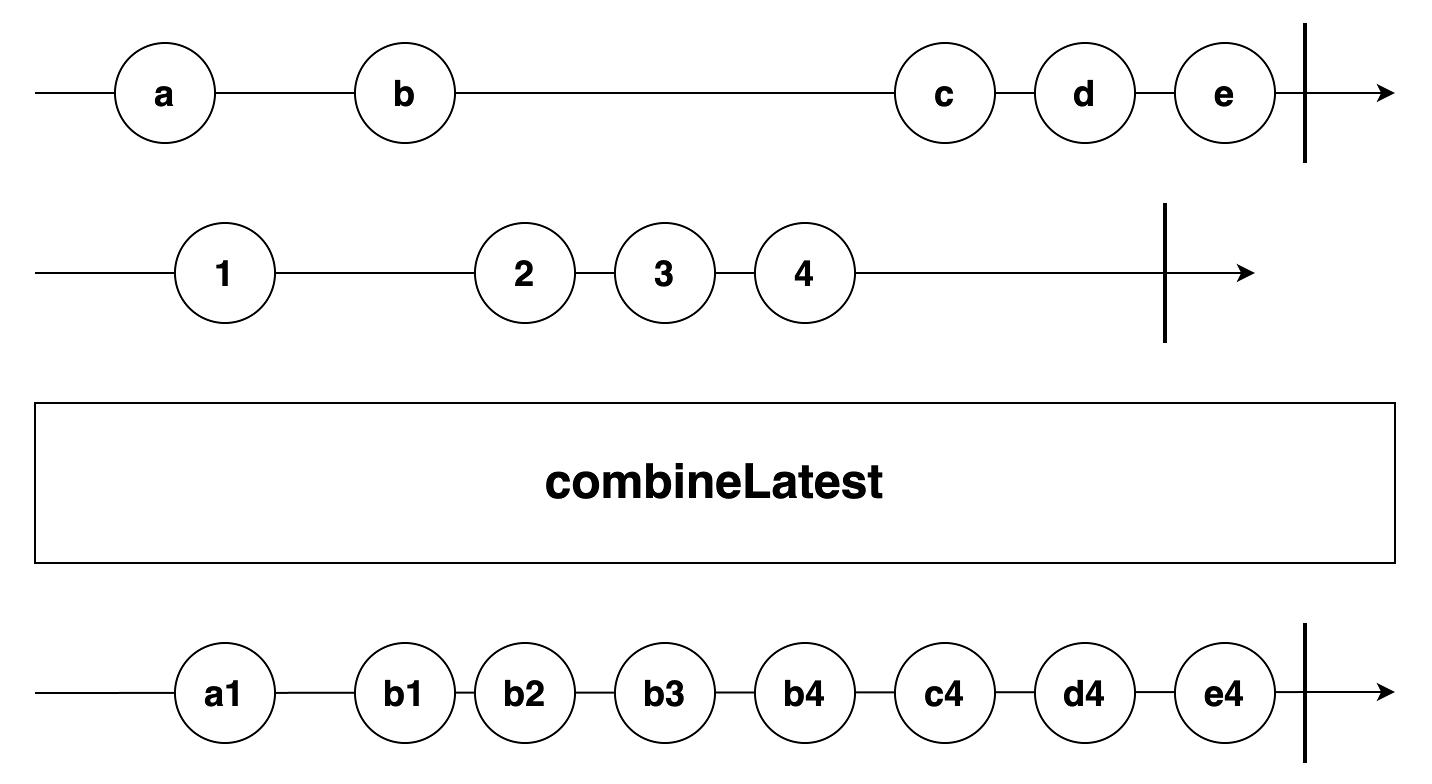
combineLatest 연산자는 forkJoin 함수와 비슷하지만, 옵저버블 구독을 완료하기 전이라도 각 옵저버블의 가장 최신 값을 합해서 바로 발행한다.
배열 각각의 요소가 바뀔 때마다 최신으로 바뀐 배열을 매번 발행한다. complete 함수를 호출하기 전이라도 각 옵저버블의 모든 값을 하나로 합해서 발행한다.
연산자 원형
combineLatest<T, R>(
...observables: Array<ObservableInput<any>
| Array<ObservableInput<any>>
| ((...values: Array<any>) => R)>
): OperatorFunction<T, R>
특징 - 함수를 인자로 사용할 수 있다.
/* combineLatest 연산자의 사용 예 */
const { timer, combineLatest } = require('rxjs');
const { take } = require('rxjs/operators');

const req1$ = timer(0, 400).pipe(take(6));
const req2$ = timer(0, 300).pipe(take(10));
const req3$ = timer(0, 500).pipe(take(7));

combineLatest(req1$, req2$, req3$).subscribe(result => console.log(result));
[코드 6-5] combineLatest 연산자의 사용 예
실행 결과
[ 0, 0, 0 ]
[ 0, 1, 0 ]
[ 1, 1, 0 ]
[ 1, 1, 1 ]
[ 1, 2, 1 ]
[ 2, 2, 1 ]
[ 2, 3, 1 ]
[ 2, 3, 2 ]
[ 3, 3, 2 ]
[ 3, 4, 2 ]
[ 3, 4, 3 ]
[ 3, 5, 3 ]
[ 4, 5, 3 ]
[ 4, 6, 3 ]
[ 5, 6, 3 ]
[ 5, 6, 4 ]
[ 5, 7, 4 ]
[ 5, 8, 4 ]
[ 5, 8, 5 ]
[ 5, 9, 5 ]
[ 5, 9, 6 ]
옵저버블 각각은 6개, 10개, 7개 값을 발행하는데, 처음 값은 timer 함수의 첫 번째 인자 0으로 설정해 바로 발행하도록 하였다.
처음 발행하는 값 각각이 모두 모인 0일 때 첫 실행 결과를 출력하고, 그 이후 옵저버블 3개 중 하나라도 최신 값을 발행하면 바로 합해서 배열을 업데이트 하고 실행 결과를 출력한다.
/* project 함수를 인자로 사용한 예 */
const { timer, combineLatest } = require('rxjs');
const { take } = require('rxjs/operators');

const req1$ = timer(0, 400).pipe(take(6));
const req2$ = timer(0, 300).pipe(take(10));
const req3$ = timer(0, 500).pipe(take(7));

combineLatest(req1$, req2$, req3$, (a, b, c) => `req1: ${a}, req2: ${b}, req3: ${c}`)
  .subscribe(result => console.log(result));
[코드 6-6] project 함수를 인자로 사용한 예
실행 결과
req1: 0, req2: 0, req3: 0
req1: 0, req2: 1, req3: 0
req1: 1, req2: 1, req3: 0
req1: 1, req2: 1, req3: 1
req1: 1, req2: 2, req3: 1
req1: 2, req2: 2, req3: 1
req1: 2, req2: 3, req3: 1
req1: 2, req2: 3, req3: 2
req1: 3, req2: 3, req3: 2
req1: 3, req2: 4, req3: 2
req1: 3, req2: 4, req3: 3
req1: 3, req2: 5, req3: 3
req1: 4, req2: 5, req3: 3
req1: 4, req2: 6, req3: 3
req1: 5, req2: 6, req3: 3
req1: 5, req2: 6, req3: 4
req1: 5, req2: 7, req3: 4
req1: 5, req2: 8, req3: 4
req1: 5, req2: 8, req3: 5
req1: 5, req2: 9, req3: 5
req1: 5, req2: 9, req3: 6
옵저버블 각각에서 값을 발행할 때마다 조합해 순서대로 project 함수의 인자로 사용하고, project 함수가 리턴하는 결과를 발행한다.
옵저버블 내부에는 각 최신값이 있는 배열을 project 함수의 인자로 사용해 호출할 수 있다.
5. zip 연산자
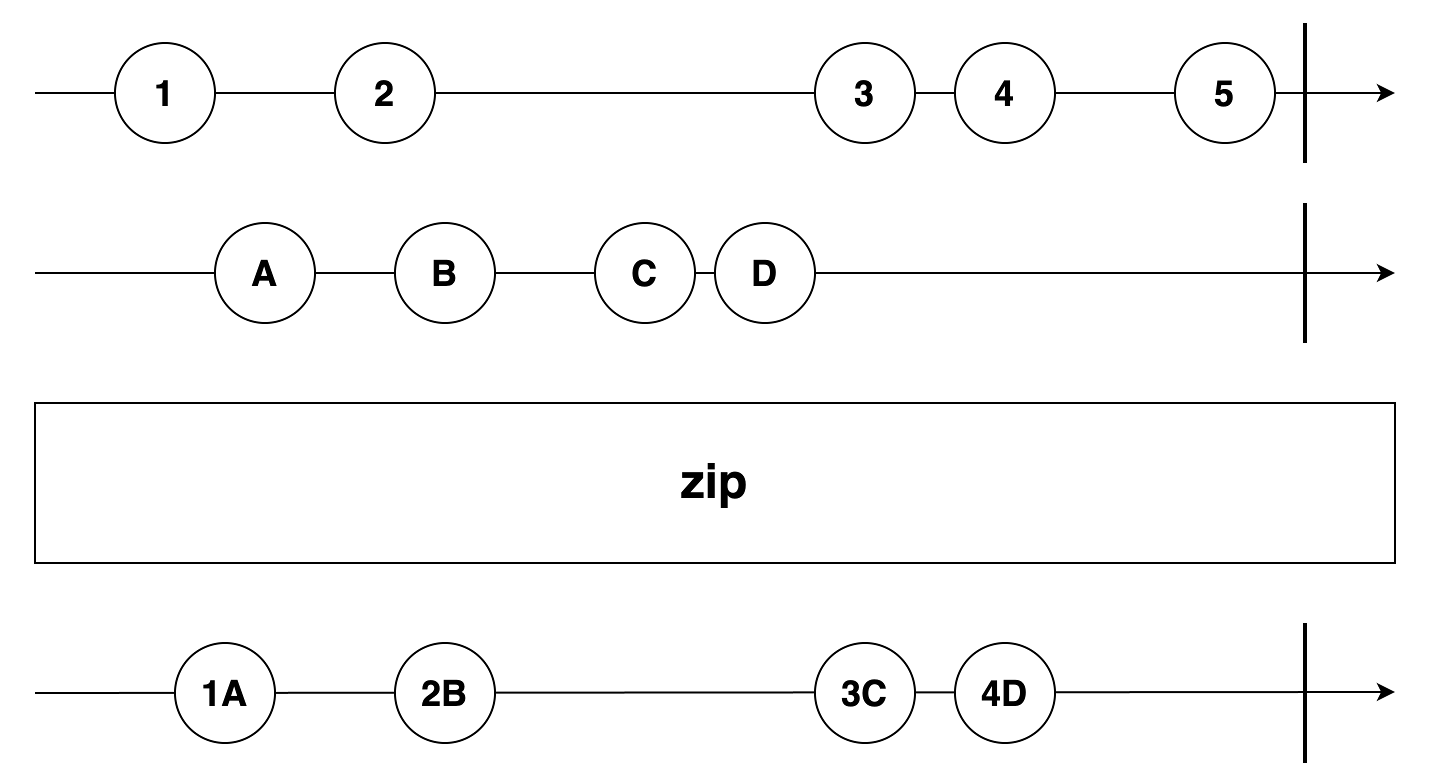
zip 연산자는 각 옵저버블을 동시에 구독한 후 발행하는 값 각각을 버퍼에 저장한다. 같은 순서에 해당하는 값이 모두 준비되었을 때 합한 값을 발행한다. 각 옵저버블에서 값을 발행하는 순서에 맞게 짝을 맞춰 발행한다는 것이 combineLatest 연산자와의 차이점이다.
연산자 원형
zip<T, R>(
...observables: Array<ObservableInput<any> | ((...values: Array<any>) => R)>
): OperatorFunction<T, R>
zip 연산자의 내부 구현 - 인자로 나열한 각 옵저버블을 매핑하는 배열이 있고 배역 각각에 옵저버블이 발행하는 값을 저장한다. 그리고 이 각 배열을 순회할 이터레이터가 있다. 각 옵저버블에서 하나라도 값을 발행할 때마다 해당 이터레이터에 다음 값이 있는지 확인한다. 만약 모든 이터레이터에 다음 순회할 값이 있으면 이터레이터 각각의 다음 값을 가져온 후 하나로 합해서 발행한다.

기본적으로 각 값을 배열로 합해서 발행한다. combineLatest 연산자처럼 마지막 인자에 함수가 있으면 이를 합하는 project 함수를 이용해 원하는 형태로 합할 수 있다.
/* 과일 착즙하기 */
const { of, zip } = require('rxjs');

const fruits$ = of('오렌지', '바나나', '키위');
const numbers$ = of(5, 3, 2, 10, 11);

zip(fruits$, numbers$, (fruit, number) => `${fruit} ${number}개`)
  .subscribe(combination => console.log(`${combination} 착즙`));
[코드 6-7] 과일 착즙하기
실행 결과
오렌지 5개 착즙
바나나 3개 착즙
키위 2개 착즙
짝이 맞는 개수까지만 합해서 값을 발행하고 구독을 완료한다.
6. startWith 연산자
startWith 연산자는 구독하는 어떤 옵저버블이 특정 값을 발행하기 전 미리 나열한 인자를 발행하는 역할을 한다. 단, 나열된 값을 그대로 발행하기만 하고 구독하지는 않는다.
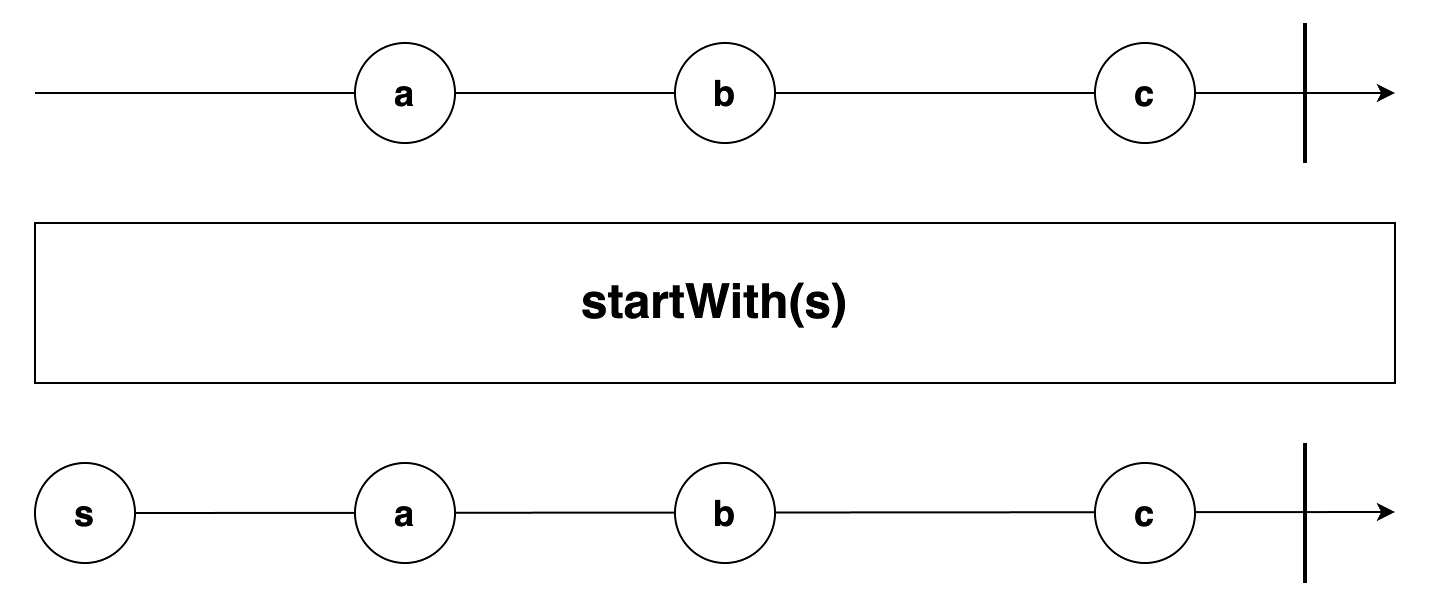
연산자 원형
startWith<T>(...array: Array<T | SchedulerLike>): MonoTypeOperatorDunction<T>
/* startWith 연산자의 사용 예 */
const { interval } = require('rxjs');
const { take, startWith } = require('rxjs/operators');

interval(1000).pipe(
  take(5),
  startWith('대기 중.. 구독됨.. waiting... subscribed.')
).subscribe(value => console.log(value));
[코드 6-8] startWith 연산자의 사용 예
실행 결과
대기 중.. 구독됨.. waiting... subscribed.
0
1
2
3
4
interval 함수는 구독 후 일정 시간이 지날 때까지는 값을 발행하지 않으므로 startWith 연산자를 사용해 옵저버블을 미리 구독한다는 문구를 출력했다.
6-1. startWith 연산자로 여러 개 연속 값을 먼저 발행하기
/* 여러 개 인자를 사용하는 startWith 연산자 예 */
const { range } = require('rxjs');
const { startWith, scan } = require('rxjs/operators');

range(4, 3).pipe(
  startWith(1, 2, 3),
  scan((x, y) => x + y)
).subscribe(sum => console.log(`range(4,3).startWith(1, 2, 3) sum: ${sum}`));

range(4, 3).pipe(
  scan((x, y) => x + y)
).subscribe(sum => console.log(`range(4,3) sum: ${sum}`));
[코드 6-9] 여러 개 인자를 사용하는 startWith 연산자 예
실행 결과
range(4,3).startWith(1, 2, 3) sum: 1
range(4,3).startWith(1, 2, 3) sum: 3
range(4,3).startWith(1, 2, 3) sum: 6
range(4,3).startWith(1, 2, 3) sum: 10
range(4,3).startWith(1, 2, 3) sum: 15
range(4,3).startWith(1, 2, 3) sum: 21
range(4,3) sum: 4
range(4,3) sum: 9
range(4,3) sum: 15- startWith(1, 2, 3) 사용 - 1, 2, 3을 먼저 발행한 후 1, 3, 6 순서로 값을 발행한다.
- range(4, 3) 만 사용 - 4부터 연속한 3개 값은 4, 5, 6을 발행해 4, 9, 15를 발행한다.
startWith 연산자는 소스 옵저버블의 값을 발행하기 전 startWith 연산자의 인자를 순서대로 발행한 뒤에 소스 옵저버블을 발행한다.
'RxJS' 카테고리의 다른 글
| 8장. 유틸리티 연산자 요약 (0) | 2024.08.02 |
|---|---|
| 7장. 수학 및 결합 연산자 요약 (0) | 2024.08.02 |
| 5장. 변환 연산자 요약 (0) | 2024.07.31 |
| 4장. 필터링 연산자 요약 (0) | 2024.07.29 |
| 3장. 생성 함수 요약 (0) | 2024.07.25 |