스케줄러란?
옵저버가 옵저버블을 구독할 때 값을 전달받는 순서와 실행 컨텍스트를 관리하는 역할을 하는 자료구조다.
1. 이벤트 루프와 RxJS의 스케줄러 개념
RxJS는 이벤트 루프 구조에서 로직 처리를 미루는 스케줄려를 구현하려고 플랫폼 환경(브라우저 또는 Node.js 환경)에 따라 제공하는 API 를 적절하게 활용한다.
주요 API
- setTimeout - 특정 시간 뒤로 로직 실행을 미룸
- setInterval - 특정 시간마다 반복해서 로직을 실행
- setImmediate - 마이크로소프트 계열 브라우저와 Node.js 에서 현재 이벤트 루프 주기 끝에 로직을 실행
- process.nextTick - Node.js 에서 이벤트 루프와 관계없이 무조건 현재 작업이 완료된 직후 로직을 실행
- window.requestAnimationFrame - 브라우저에서 프레임이 끊기지 않도록 각 프레임마다 로직을 실행
RxJS 에서 제공하는 스케줄러
- 시간 기반의 스케줄러
- 비동기 처리를 위한 스케줄러
- 브라우저의 애니메이션 프레임 손실을 막는 스케줄러
RxJS 공식문서 상 스케줄러의 구성 요소
- 자료 구조 - 작업물을 우선 순위나 다른 기준에 따라서 저장하고 큐잉한다.
- 실행 컨텍스트 - 작업(task)을 실행하는 때와 위치를 가리킨다.
- (가상) 클락 - now 함수라는 스케줄러의 시간을 가리키는 게터 함수를 제공한다. 특정 스케줄러에 스케줄한 작업들은 클락으로 설정한 시간에 맞춰 동작한다.
스케줄러 사용 방법
- subscribeOn, observeOn 연산자나 스케줄러를 인자로 사용하는 연산자를 사용하는 방법
- 직접 연산자를 구현할 때 스케줄러에 있는 schedule 함수를 호출하는 방법
대표적인 스케줄러
- AsyncScheduler - 일정 시간 이후에 실행되도록 만든다.
- AsapScheduler - 비동기 동작을 최대한 빨리 실행하게 만든다.
- QueueScheduler - 내부에 큐(queue)를 두고 작업을 넣어 동기로 실행하게 만든다.
- 기타 - 애니메이션과 테스트 코드에 사용하는 스케줄러
2. 스케줄러 구조
스케줄러는 schedule 함수를 호출해서 동작한다. schedule 함수는 해당 스케줄러와 매칭하는 액션 객체를 생성해 해당 액션을 실행한다.
/* Scheduler 클래스의 구현 코드 일부 */
constructor(SchedulerAction, now = Scheduler.now) {
  // ...생략
}

schedule(work, delay = 0, state) {
  return new this.SchedulerAction(this, work).schedule(state, delay);
}[ 코드 13-1] Scheduler 클래스의 구현 코드 일부
액션은 Action 클래스를 상속받는데 내부적으로 동작해야 하는 장업(work) 함수를 인자로 사용한다. schedule 함수를 호출할 때 이 작업이 실행해야 할 상태 값인 state 를 전달 받는다.
스케줄러는 액션에 상태값을 전달하는 역할을 하고, 액션은 스케줄러의 작업 단위이다.
/* AsyncScheduler 의 액션 생성 */
import {AsyncScheduler} from "rxjs/internal/scheduler/AsyncScheduler";
import {AsyncAction} from "rxjs/internal/scheduler/AsyncAction";

export const async = new AsyncScheduler(AsyncAction);
[코드 13-2] AsyncScheduler 의 액션 생성
3. 대표 스케줄러
3-1. AsyncScheduler
AsyncScheduler 는 대표 스케줄러들이 상속받는 부모 스케줄러다. 각 작업 단위로 보면 setTimeout 함수처럼 일회성으로 일정 시간 후 정의한 작업을 동작시키는 스케줄러다.
AsyncScheduler 는 내부에 setInterval 함수를 두고 일정 간격마다 요청이 오는 작업을 해당 스케줄러를 사용 완료할 때까지 처리한다.
AsyncScheduler 는 delay 를 인자로 사용해 일정 시간 후 작업을 처리한다. 이 스케줄러를 상속받는 다은 스케줄러는 schedule 함수에 delay 를 사용했을 때 부모인 AsyncScheduler 를 이용해 작업을 처리한다.
/* AsyncScheduler 의 상속 예 */
const { asyncScheduler } = require('rxjs');

asyncScheduler.schedule(function work(value) {
  value = value || 0;
  console.log('value: ' + value);
  const selfAction = this;
  selfAction.schedule(value + 1, 1000);
}, 1000);
[코드 13-3] AsyncScheduler 의 상속 예
실행 결과
value: 0
value: 1
... 이하 생략
1초마다 1씩 증가라는 값을 발행한다.
asyncScheduler 에 schdule 함수로 work 함수를 사용하면 AsyncAction 인스턴스에서 실행되며 this 가 가리키는 인스턴스는 AsyncAction 이 된다. 따라서 work 함수 안에 있는 selfAction 은 AsyncAction 인스턴스다.
[코드 13-3]에서 처음 호출하는 schedule 함수는 스케줄러에서 호출하는 함수이고, 그 안에서 호출하는 schedule 함수는 액션에서 호출하는 함수이다.
/* 스케줄러에서 schedule 함수를 호출할 때마다 새로 생성하는 액션 */
schedule(work, delay = 0, state) {
  return new this.SchedulerAction(this, work).schedule(state, delay);
}
[코드 13-4] 스케줄러에서 schedule 함수를 호출할 때마다 새로 생성하는 액션
스케줄러에서 schedule 함수를 호출할 때마다 해당 스케줄러의 액션 객체를 새로 생성해준 후 work 함수를 실행하고, 액션에서 호출하는 schedule 함수는 액션 객체 안에서 별개의 작업을 실행하는 역할이다.
3-2. AsapScheduler
AsapScheduler 는 각 플랫폼에 맞게 동기로 작업을 처리한 후 가능하면 빠르게 비동기로 작업을 처리하는 스케줄러다.
- 현재 이벤트 처리의 끝이나 현재 실행 로직 다음에 실행해야 할 이벤트 처리보다 더 빠르게 처리해야 하는 작업이 있을 때 사용
AsapScheduler 의 구현 원리
AsapScheduler 는 setImmeediate 함수를 호출한 후 actions 배열에 있는 액션을 매번 꺼내 비동기 동작을 한다. 그리고 work 함수를 호출할 때 해당 액션의 상태 값 (state) 을 전달해 동작을 실행한다.
/* schedule 함수 호출 */
const {Immediate} = require("rxjs/internal-compatibility");

requestAsyncId(scheduler, id, delay = 0) {
  if (delay !== null && delay > 0) {
    return super.requestAsyncId(scheduler, id, delay);
  }
  scheduler.actions.push(this);
  return scheduler.scheduled
    || (scheduler.scheduled = Immediate.setImmediate(
      scheduler.flush.bind(scheduler, null)
    ));
}
[코드 13-5] schedule 함수 호출
0보다 큰 delay 값이 있으면 super 를 이용해 부모인 AsyncAction 의 동작을 호출한다. 그렇지 않으면 액션(this) 자체를 actions 배열에 푸시한다.
/* 스케줄러의 actions 배열 사용 방식 (AsapScheduler 의 flush 메서드) */
import {AsyncScheduler} from "rxjs/internal/scheduler/AsyncScheduler";

export class AsapScheduler extends AsyncScheduler {
  flush(action) {
    this.active = true;
    this.scheduled = undefined;
    const {actions} = this;
    // 생략...
    action = action || actions.shift();
    do {
      if (error = action.execute(action.state, action.delay)) {
        break;
      }
    } while (++index < count && (action = actions.shift()));
    // 생략...
  }
}
[코드 13-6] 스케줄러의 actions 배열 사용 방식 (AsapScheduler 의 flush 메서드)
actions 에서 하나하나 값을 꺼내 동작할 때는 execute 함수를 호출한다. 이 때 state와 함께 work 함수를 호출한다.
/* AsapScheduler 를 이용한 동기 및 비동기 처리 예 */
const { of, asapScheduler } = require("rxjs");

console.log('start');
of(1, 2, 3, asapScheduler).subscribe(x => console.log(x));
console.log(`actions length: ${asapScheduler.actions.length}`);
console.log('end');
[코드 13-7] AsapScheduler 를 이용한 동기 및 비동기 처리 예
실행 결과
start
actions length: 1
end
1
2
3
start와 end가 동기로 먼저 실행되고, 1부터 3까지는 비동기로 한 번에 실행된다. 또한, 마이크로 큐에서 1개의 액션을 처리하려고 actions 배열에 1개의 액션을 추가했다. 이 1개의 액션은 인자로 나열된 1부터 3까지의 값을 하나하나 꺼내 전달하는 역할을 한다.
/* ArrayObservable 의 구현 코드 일부 */
static of(...array) {
  // ...생략
  if (len > 1) {
    return new ArrayObservable(array, scheduler);
  }
  // ...생략
}

static dispatch(state) {
  const {array, index, count, subscriber} = state;
  if (index >= count) {
    subscriber.complete();
    return;
  }
  subscriber.next(array[index]);
  if (subscriber.closed) {
    return;
  }
  state.index = index + 1;
  this.schedule(state);
}

_subscribe(subscriber) {
  // ...생략
  if (scheduler) {
    return scheduler.schedule(ArrayObservable.dispatch, 0, {array, index, count, subscriber});
  }
  // ...생략
}
[코드 13-8] ArrayObservable 의 구현 코드 일부
- of 함수 - 내부 array 에 나열된 값을 담아 실행
- dispatch - work 함수이며, 상태 값으로 전달되는 객체에는 array, index, count, subscriber 가 있음
/* AsapScheduler 의 재귀 호출 */
const { asapScheduler } = require("rxjs");

console.log('start');
asapScheduler.schedule(function work(value) {
  value = value || 1;
  console.log(value);
  var selfAction = this;
  if (value < 3) {
    selfAction.schedule(value + 1);
  }
});
console.log(`actions length: ${asapScheduler.actions.length}`);
console.log('end');
[코드 13-9] AsapScheduler 의 재귀 호출
실행 결과
start
actions length: 1
end
1
2
3
3-3. QueueScheduler
QueueScheduler 는 동기 방식의 스케줄러다. actions 배열을 반복 실행하며 먼저 들어온 값을 먼저 사용하는 큐 자료구조를 사용한다.
/* QueueScheduler 의 구현 코드 일부 */
// AsyncScheduler 를 상속받을 뿐 구현은 없음
import {AsyncScheduler} from "rxjs/internal/scheduler/AsyncScheduler";
export class QueueScheduler extends AsyncScheduler { }
[코드 13-10] QueueScheduler 의 구현 코드 일부
QueueScheduler 는 동기 방식이므로 반복 실행 시작 전 플래그를 표시하고, 반복 실행 중이면 actions 배열에 푸시만 한다. 즉, actions 배열에 아직 실행해야 할 동작이 남아 있으면 배열 요소를 모두 실행할 때까지 반복해서 동작한다.
/* QueueAction 의 schedule 함수 구현 코드 */
// request, recycle 은 호출하지 않고 실행만 한다.
schedule(state, delay = 0) {
  if (delay > 0) {  // delay 값이 0보다 크면 AsapScheduler 를 상속받아 실행
    return super.schedule(state, delay);
  }
  this.delay = delay;
  this.state = state;
  this.scheduler.flush(this); // AsyncScheduler 의 flush 메서드 호출
  return this;
}
execute(state, delay) {
  return (delay > 0 || this.closed) ?
    super.execute(state, delay) :   // delay == 0 이고 !this.closed 이므로 실행함.
    this._execute(state, delay);
}
[코드 13-11] QueueAction 의 schedule 함수 구현 코드
스케줄러의 flush 메소드를 동기 방식으로 실행한다.
/* AsyncScheduler 의 flush 메소드 구현 코드 */
flush(action) {
  const { actions } = this;
  if (this.active) {
    actions.push(action);
    return;
  }
  let error;
  this.active = true;
  do {
    if (error = action.execute(action.state, action.delay)) {
      break;
    }
  } while (action = actions.shift()); // 스케줄러 큐 모두 사용
  this.active = false;
  if (error) {
    while (action = actions.shift()) {
      action.unsubscribe();
    }
    throw error;
  }
}
[코드 13-12] AsyncScheduler 의 flush 메소드 구현 코드
flush 함수 안에서 스케줄러의 active 플래그를 반복 실행 시작 전후에 설정한다.
/* AsyncAction 의 _execute 함수 구현 코드 */
_execute(state, delay) {
  let errored = false;
  let errorValue = undefined;

  try {
    this.work(state);
  } catch (e) {
    errored = true;
    errorValue = !!e && e || new Error(e);
  }

  if (errored) {
    this.unsubscribe();
    return errorValue;
  }
}
[코드 13-13] AsyncAction 의 _execute 함수 구현 코드
QueueScheduler 사용 - 연산자 안에서 동기 방식 및 콜스택이 아닌 반복문으로 꼬리 재귀를 호출해야 하거나 큐에 넣어 순서를 맞춰야 할 때 사용하면 좋다.
/* QueueScheduler 를 사용하는 피보나치 수열 */
const { queueScheduler } = require('rxjs');

const n = 6;

queueScheduler.schedule(function (state) {
  console.log(`fibonacci[${state.index}]: ${state.a}`);
  if (state.index < n) {
    this.schedule({
      index: state.index + 1,
      a: state.b,
      b: state.a + state.b
    });
  }
}, null, { index: 0, a: 0, b: 1 });
[코드 13-14] QueueScheduler 를 사용하는 피보나치 수열
실행 결과
fibonacci[0]: 0
fibonacci[1]: 1
fibonacci[2]: 1
fibonacci[3]: 2
fibonacci[4]: 3
fibonacci[5]: 5
fibonacci[6]: 8
두번째 인자 null 은 delay 값을 지정하지 않겠다는 의미이다. 이유는 QueueScheduler 도 delay 값을 지정하면 AsyncScheduler 를 상속받아 동작하므로 null 로 지정했다. 세번째 인자는 초기값을 넣었다.index 값을 1씩 증가시켜 재귀로 a, b 의 값을 누적 시킨다.
큐에서 하나식 꺼내서 순차적으로 동작함을 확인할 수 있다.
4. 스케줄러에서 사용하는 연산자
4-1. subscribeOn 연산자
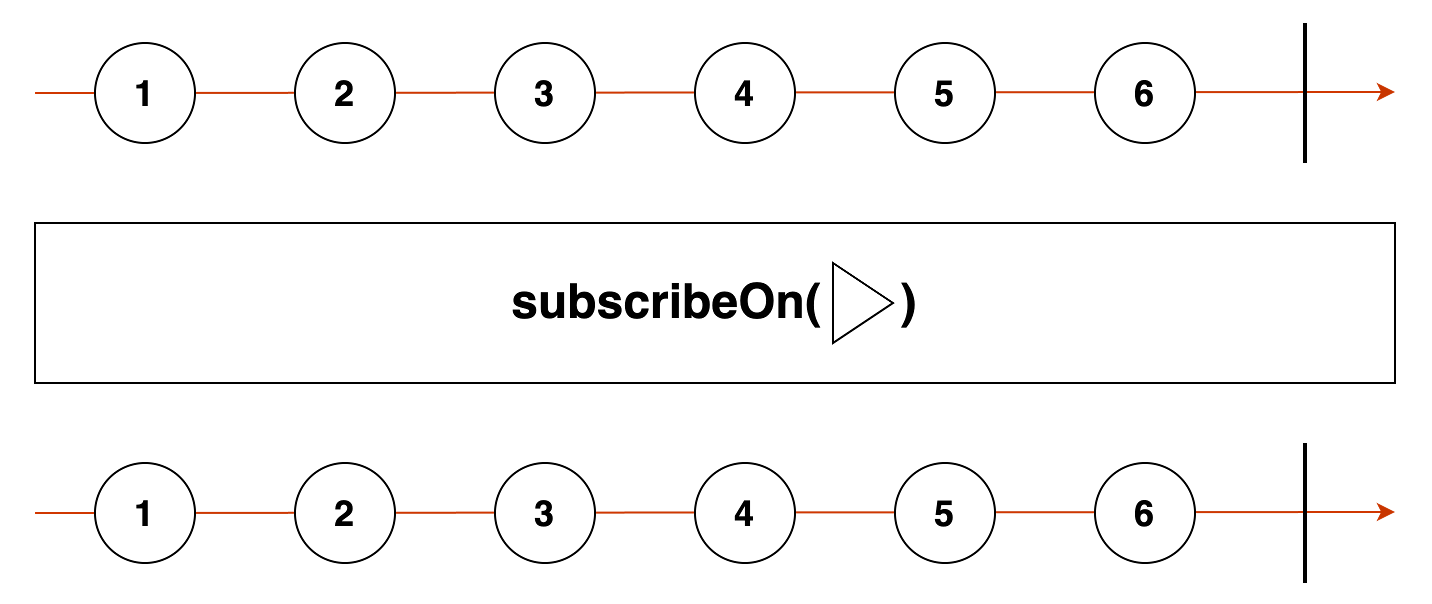
subscribeOn 연산자는 구독하는 옵저버블 자체를 인자로 사용할 스케줄러로 바꿔준다.
/* subscribeOn 연산자의 사용 예 */
const { Observable, asyncScheduler } = require('rxjs');
const { subscribeOn } = require('rxjs/operators');

const source$ = Observable.create(observer => {
  console.log("BEGIN source");
  observer.next(1);
  observer.next(2);
  observer.next(3);
  observer.complete();
  console.log("END source");
});

console.log("before subscribe");
source$.pipe(subscribeOn(asyncScheduler, 1000)).subscribe(x => console.log(x));
console.log("after subscribe");
[코드 13-15] subscribeOn 연산자의 사용 예
실행 결과
before subscribe
after subscribe
BEGIN source
1
2
3
END source
'after subscribe' 를 출력할 때까지 동기 방식으로 실행되며, 1초 후 그 다음에는 비동기로 나머지 결과를 출력한다.
구독할 때 맨 앞 옵저버블의 작업을 subscribeOn 연산자에서 지정한 스케줄러로 실행하는 것이다.
연산자 원형
subscribeOn<T>(
scheduler: SchedulerLike, delay: number = 0
): MonoTypeOperatorFunction<T>
- scheduler - 구독 작업을 실행하는 스케줄러를 설정
- delay - 숫자 타입으로 지연 시간을 설정
/* subscribeOn 연산자의 구현 코드 일부 */
const {SubscribeOnObservable} = require("rxjs/internal-compatibility");
call(subscriber, source) {
  return new SubscribeOnObservable(source, this.delay, this.scheduler)
    .subscribe(subscriber);
}
[코드 13-16] subscribeOn 연산자의 구현 코드 일부
/* SubscribeOnObservable 의 구현 코드 일부 */
static dispatch(arg) {
  const {source, subscriber} = arg;
  return this.add(source.subscribe(subscriber));
}

_subscribe(subscriber) {
  const delay = this.delayTime;
  const source = this.source;
  const scheduler = this.scheduler;
  return scheduler.schedule(SubscribeOnObservable.dispatch, delay, {source, subscriber});
}
[코드 13-17] SubscribeOnObservable 의 구현 코드 일부
스케줄러 안에서 소스 옵저버블 구독 부분을 실행한다는 것을 알수 있다. 소스 옵저버블뿐만 아니라 그 아래 영향을 받는 다은 연산자에서 파생한 옵저버블도 해당 스케줄러의 영향을 받는다.
4-2. observeOn 연산자
subscribeOn 연산자를 사용하면 모든 스트림이 해당 스케줄러로 바뀐다. 이 때 observeOn 연산자를 사용하면 observeOn 이 호출된 이후부터 스케줄러를 바꿔 실행할 수 있다.
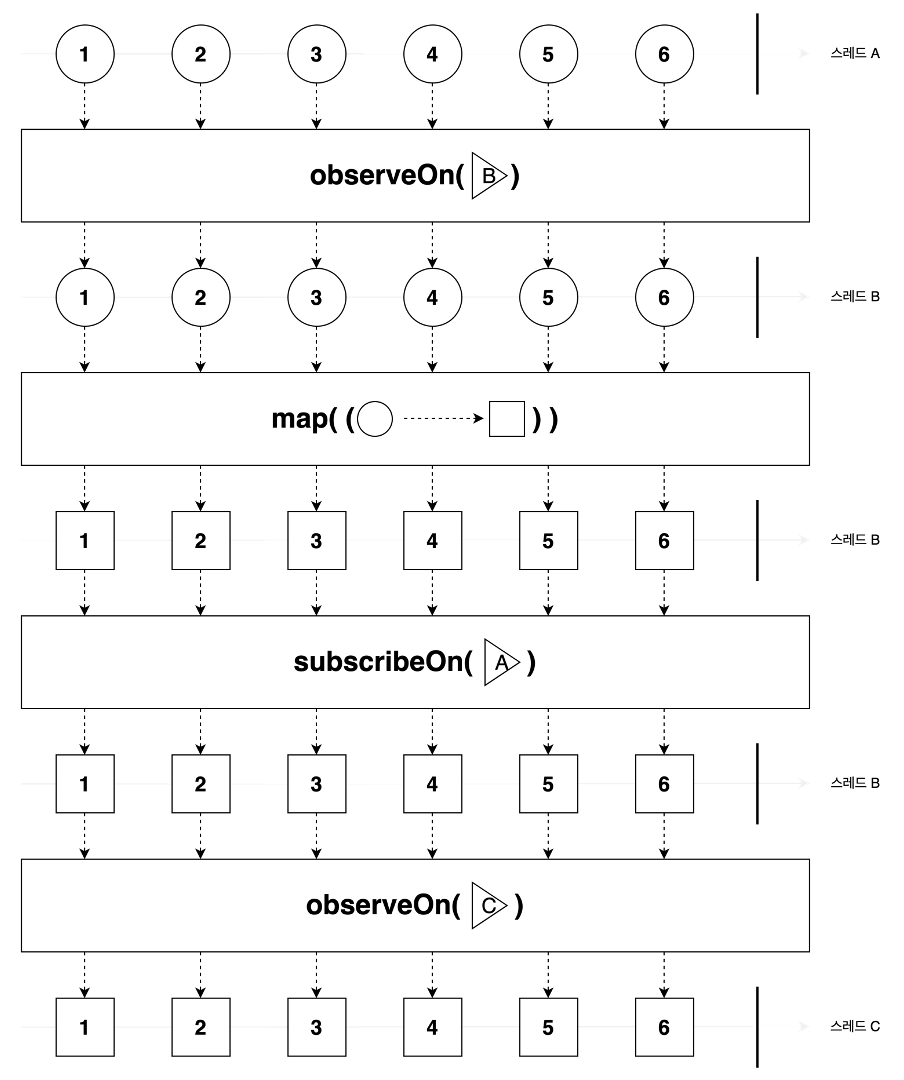
특징 - 여러 연산자가 연속으로 연결되었을 때 가장 마지막에 호출된 연산자의 스케줄러가 우선 적용된다.
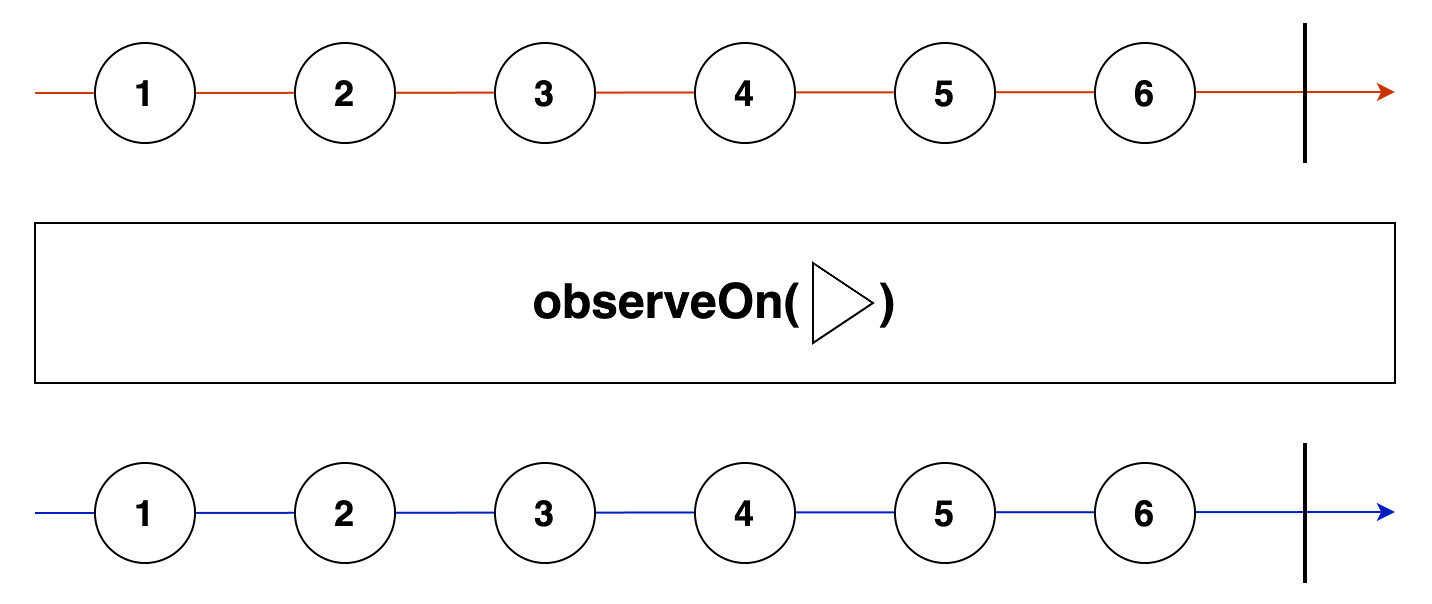
연산자에 있는 세모 모양의 스케줄러를 이용해서 구독할 때 next, error, complete 함수를 destination 이라는 생성자의 파라미터로 전달한다.
subscribeOn 연산자가 위치한 부분 가장 위 옵저버블이 시작하는 부분부터 사용할 스케줄러를 지정한다.
observeOn 연산자는 이 연산자가 호출한 지점부터 아래에 있는 모든 연산자가 지정한 스케줄러로 동작하도록 영향을 준다.
그렇기 때문에 중간에 observeOn 을 여러번 호출해 연산자별로 다른 스케줄러를 사용할 수 있는 것이다.
간단히 정리하자면 subscribeOn 는 밑에서 위(bottom up)로 observeOn 은 위에서 아래(top down)방향으로 영향을 준다고 이해하면 된다.
각 연산자가 연속으로 여러 개 연결되었을 때 subscribeOn 은 제일 먼저 연결된 연산자의 스케줄러가 적용되고, observeOn 은 가장 나중에 연결된 연산자의 스케줄러를 사용한다고 이해하면 된다. 해당 방향으로 덮어쓴다는 개념이다.
연산자 원형
observeOn<T>(
scheduler: SchedulerLike, delay: number = 0
): MonoTypeOperatorFuntion<T>
- scheduler - 구독 작업을 실행하는 스케줄러를 설정
- delay - 숫자 타입으로 지연 시간을 설정
/* observeOn 연산자의 사용 예 */
const { Observable, asyncScheduler } = require('rxjs');
const { observeOn } = require('rxjs/operators');

const source$ = Observable.create(observer => {
  console.log("BEGIN source");
  observer.next(1);
  observer.next(2);
  observer.next(3);
  observer.complete();
  console.log("END source");
});

console.log("before subscribe");
source$.pipe(observeOn(asyncScheduler, 1000)).subscribe(x => console.log(x));
console.log("after subscribe");
[코드 13-18] observeOn 연산자의 사용 예
실행 결과
before subscribe
BEGIN source
END source
after subscribe
1
2
3
'after subscribe' 출력까지는 동기 방식으로 실행되고 observeOn 연산자 다음으로 생성되는 옵저버블은 1초 후 스케줄러를 이용해서 실행된다. 즉, subscribe 함수 안에 있는 next 함수의 동작이 스케줄러의 영향을 받아 1부터 3까지 출력만 1초 후 비동기로 처리한다.
observeOn 연산자 다음에 바로 subscribe 함수를 호출하지 않고 다른 연산자를 추가했어도 그 다음에 추가하는 연산자부터는 스케줄러를 이용해 옵저버블을 실행한다.
/* observeOn 연산자의 구현 코드 일부 */
import {Subscriber} from "rxjs";

export class ObserveOnSubscriber extends Subscriber {
  constructor(destination, scheduler, delay = 0) {
    super(destination);
    this.scheduler = scheduler;
    this.delay = delay;
  }

  static dispatch(arg) {
    const {notification, destination} = arg;
    notification.observe(destination);
    this.unsubscribe();
  }

  scheduleMessage(notification) {
    this.add(this.scheduler.schedule(
      ObserveOnSubscriber.dispatch,
      this.delay,
      new ObserveOnMessage(notification, this.destination)
    ));
  }

  _next(value) {
    this.scheduleMessage(Notification.createNext(value));
  }

  _error(err) {
    this.scheduleMessage(Notification.createError(err));
  }

  _complete() {
    this.scheduleMessage(Notification.createComplete());
  }
}

export class ObserveOnMessage {
  constructor(notification, destination) {
    this.notification = notification;
    this.destination = destination;
  }

}
[코드 13-19] observeOn 연산자의 구현 코드 일부
dispatch 가 스케줄러의 work 함수로 동작한다. 이 때 Notification 은 객체에서 next, error, complete 함수 중 무엇을 실행할지 정해서 observeOn 함수에 있는 destination 에 전달한다.
4-3. observeOn 연산자 안 AsyncScheduler 사용
- subscribeOn 연산자 - 소스 옵저버블을 구독하는 동작 하나만 스케줄러에서 실행
- observeOn 연산자 - 스케줄러에서 next 함수로 여러 값을 전달하는 동작을 담당
/* observeOn 연산자 안 AsyncScheduler 사용 */
const { of, asyncScheduler } = require('rxjs');
const { observeOn } = require('rxjs/operators');

console.log('start');
of(1, 2, 3).pipe(observeOn(asyncScheduler, 1000)).subscribe(x => console.log(x));
console.log(`actions length : ${asyncScheduler.actions.length}`);
console.log('end');
[코드 13-20] observeOn 연산자 안 AsyncScheduler 사용
AsyncScheduler 는 각각의 action 을 setInterval 함수로 지정된 시간 뒤에 실행되도록 구현되어 있다.
action - next 함수 3개 + complete 함수 = 4개
'end'까지는 동기 방식으로 실행되고 다음부터는 1초후 스케줄러를 비동기 방식으로 살행된다.
4-4. observeOn 연산자 안 AsapScheduler 사용
- AsyncScheduler - next 함수를 호출할 때마다 setInterval 함수도 매번 호출한다.
- AsapScheduler- 스케줄러 안에 있는 actions 배열에 해당 액션을 푸시하는 동작만 한다.
/* observeOn 연산자 안 AsapScheduler 사용 */
const { of, asapScheduler } = require('rxjs');
const { observeOn } = require('rxjs/operators');

console.log('start');
of(1, 2, 3).pipe(observeOn(asapScheduler)).subscribe(x => console.log(x));
console.log(`actions length : ${asapScheduler.actions.length}`);
console.log('end');
[코드 13-21] observeOn 연산자 안 AsapScheduler 사용
실행 결과
start
actions length : 4
end
1
2
3
1~3의 출력 부분은 비동기로 실행된다. actions 배열의 4개 액션은 동기 방식으로 푸시한다.
4-5. observeOn 연산자 안 QueueScheduler 사용
/* observeOn 연산자 안 QueueScheduler 사용 */
const { of, queueScheduler } = require('rxjs');
const { observeOn } = require('rxjs/operators');

console.log('start');
of(1, 2, 3).pipe(observeOn(queueScheduler)).subscribe(x => console.log(x));
console.log(`actions length : ${queueScheduler.actions.length}`);
console.log('end');
[코드 13-22] observeOn 연산자 안 QueueScheduler 사용
실행 결과
start
1
2
3
actions length : 0
end
/* range 함수 안에 QueueScheduler 사용 */
const { range, queueScheduler } = require('rxjs');
const { mergeMap, observeOn } = require('rxjs/operators');
console.log('start queue');
range(0, 3, queueScheduler).pipe(mergeMap(x => range(x, 3, queueScheduler)))
.subscribe(x => console.log(x));
console.log('end queue');
console.log('start without queue');
range(0, 3).pipe(mergeMap(x => range(x, 3)))
.subscribe(x => console.log(x));
console.log('end without queue');[코드 13-23] range 함수 안에 QueueScheduler 사용
실행 결과
start queue
0
1
1
2
2
2
3
3
4
end queue
start without queue
0
1
2
1
2
3
2
3
4
end without queue'RxJS' 카테고리의 다른 글
| 12장. 멀티캐스팅 연산자 요약 (0) | 2024.08.07 |
|---|---|
| 11장. 서브젝트 요약 (0) | 2024.08.06 |
| 10장. 에러 처리 요약 (0) | 2024.08.05 |
| 9장. 조건 연산자 요약 (0) | 2024.08.05 |
| 8장. 유틸리티 연산자 요약 (0) | 2024.08.02 |